MyScheduleEngine — AI Employee Coming Soon.

Stop manually

MyScheduleEngine runs your service business from one command center. Text the AI assistant from iMessage, WhatsApp, or SMS - it collects client details, books the job, updates MyScheduleEngine, and triggers the rest of the workflow so your team stays in the field instead of buried in admin.

Built for cleaning, landscaping, HVAC, plumbing, roofing & field-service teams.
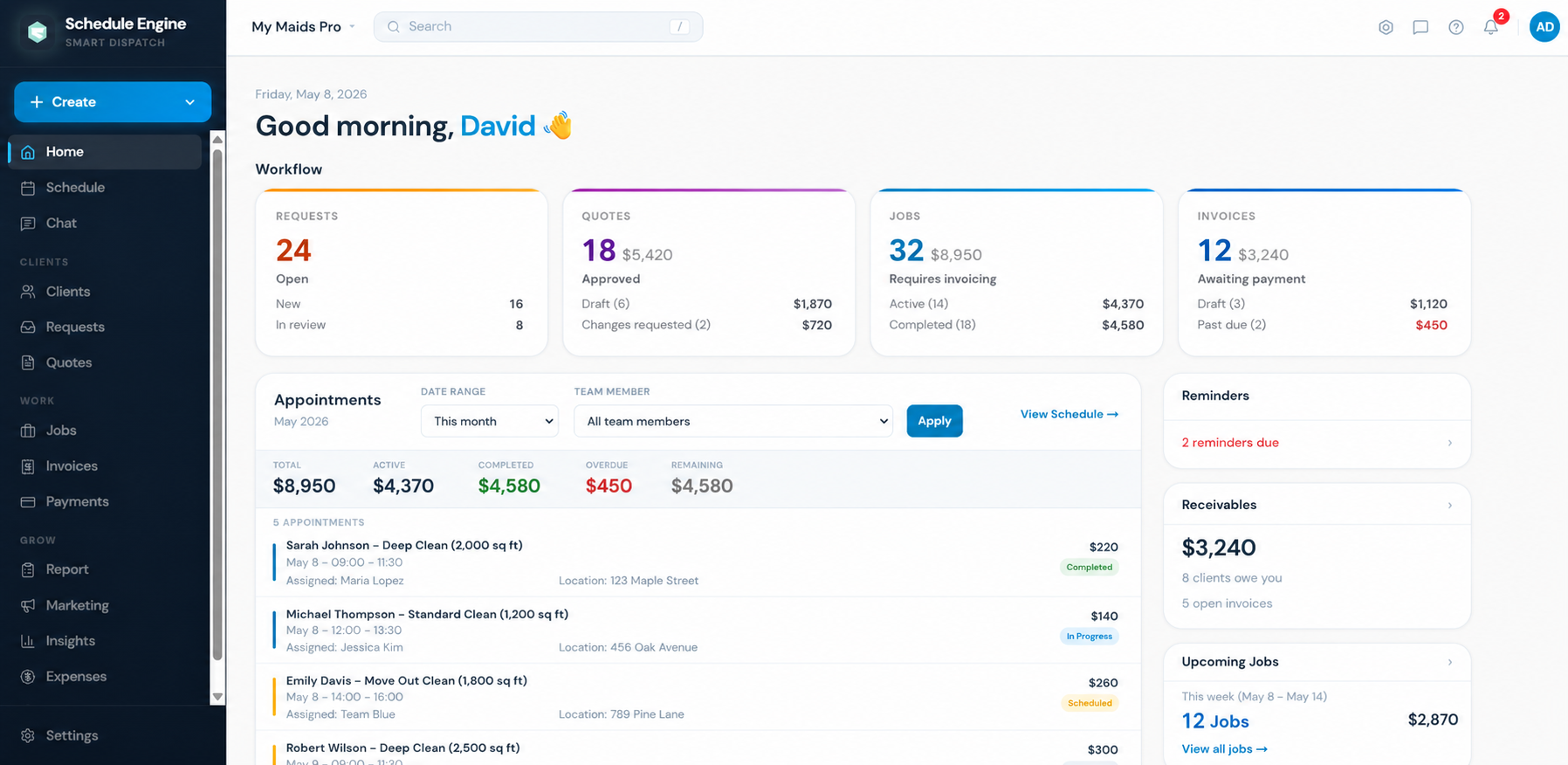
app.myscheduleengine.com/home ● Live
MyScheduleEngine command center showing today's scheduled jobs and team assignments
AI booked John Doe — Fri 10:00 AM
Invoice #1042 sent
Quote follow-up scheduled
Review request queued
On-my-way SMS sent
Built for teams that quote, schedule, dispatch, invoice & follow up — every day
Cleaning
Landscaping
HVAC
Plumbing
Electrical
Roofing
Pest Control
Contractors
Cleaning
Landscaping
HVAC
Plumbing
Electrical
Roofing
Pest Control
Contractors
Cleaning
Landscaping
HVAC
Plumbing
Electrical
Roofing
Pest Control
Contractors
The reality of running a service business

Sound familiar?

You didn't start a service business to spend your nights sending reminders, chasing payments, and digging through messages.

01

Invoices go out late

Your team finishes the job, but the invoice waits until someone has time to send it.

Send invoices and receipts straight from the workflow.
02

Payments need chasing

Unpaid invoices sit there until you manually follow up. And again. And again.

Auto-follow-up on overdue invoices.
03

Clients forget appointments

No-shows and last-minute confusion happen because reminders are inconsistent.

24-hour and 1-hour visit reminders, automatically.
04

Quotes sit too long

Leads go cold while quotes wait for someone to follow up by hand.

Quote follow-ups and quote-expiry alerts.
05

Messages are everywhere

Texts, emails, calls, notes, and provider updates live in different places.

Client communication tied to the job.
06

Reviews get forgotten

Happy clients would leave reviews — but the Google review link never gets sent at the right time.

Review request triggered after every completed job.
07

Booking still depends on you

A client texts while you're driving, quoting, or managing a crew, and the job waits until you manually enter everything.

Text the AI assistant. It collects details and books the job in MyScheduleEngine.
Manual admin quietly drains revenue, time, and momentum — every single week.
Workflow automation map

From a client text to a booked job to a paid invoice.

The AI assistant starts from a simple client message and triggers every next action inside the software — quote, schedule, dispatch, invoice, follow-up.

Client text
Booked job
Paid invoice
01

Client texts in

A lead messages from SMS, iMessage, WhatsApp, or website chat.

AI replies instantly
02

AI collects details

Name, address, service, preferred date — gathered without office back-and-forth.

Booking structured
03

Quote sent

Line items and team assignment stay attached to the client record.

Auto follow-up if quiet
04

Job booked

Client, address, schedule, and notes move into the job in one click.

Reminders queued
05

Team dispatched

Provider sees the work, office sees the schedule — no extra messages.

On-my-way SMS sent
06

Invoice created

Job value becomes an invoice the moment work wraps. Tracking begins.

Unpaid follow-ups
07

Review requested

Completed jobs trigger a review ask while work is still fresh.

Google review link sent
08

Customer rebooked

Past clients are easier to bring back than new ones are to find.

Rebooking campaigns
Feature 01 · AI Assistant

Text your AI assistant. The job gets booked.

Instead of opening the app every time a lead sends details, message the assistant from iMessage, WhatsApp, SMS, or chat. It collects the client info, creates the booking, updates the SaaS, and triggers the next workflow steps.
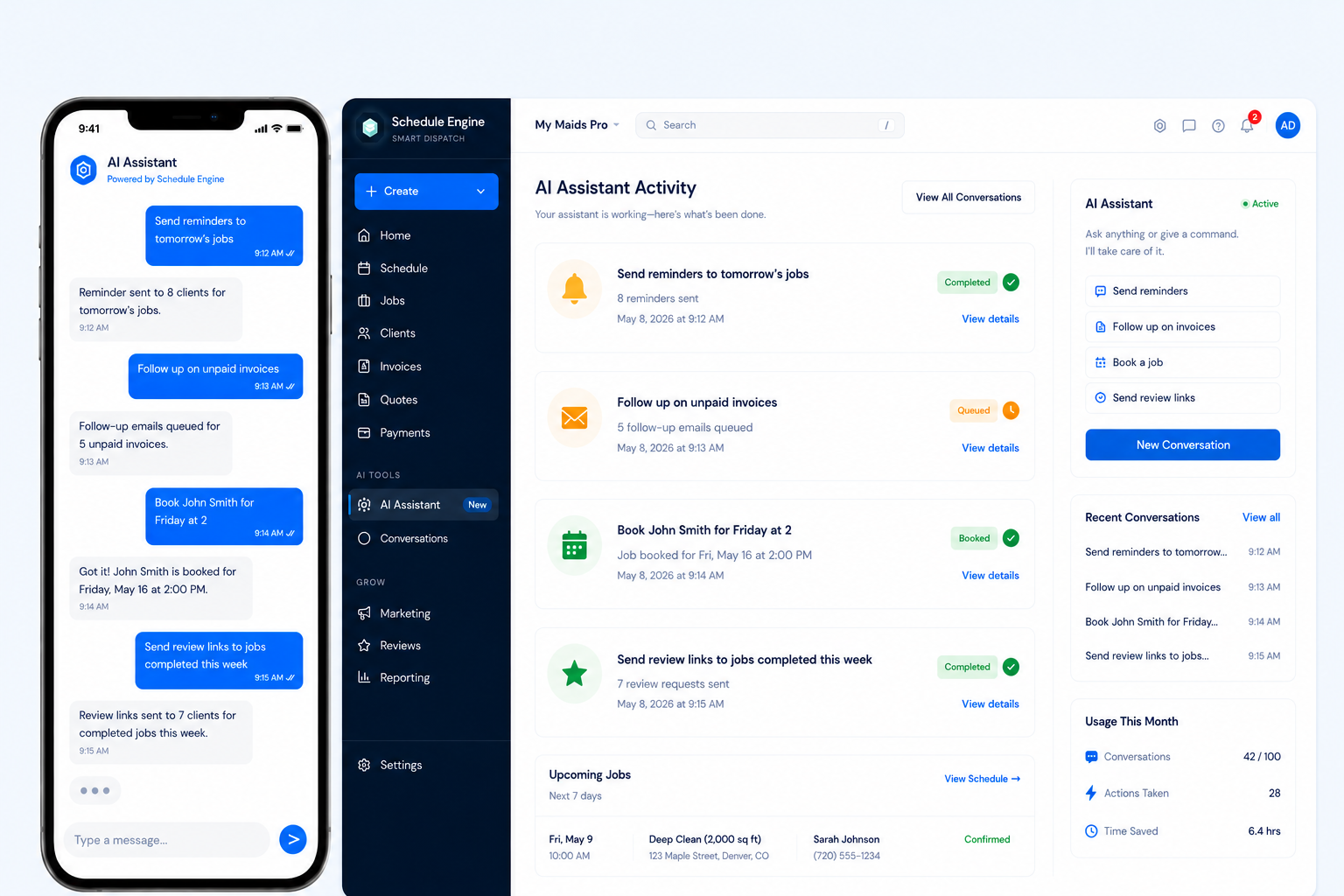
  • Collects name, phone, email, address, service, and preferred date/time
  • Books jobs from text conversations
  • Updates MyScheduleEngine records for you
  • Triggers confirmations, reminders, and follow-ups
  • Operator commands like "book John for Friday" or "follow up on unpaid invoices"
MyScheduleEngine command center with jobs, invoices and client workflow panels
28 actions taken this month
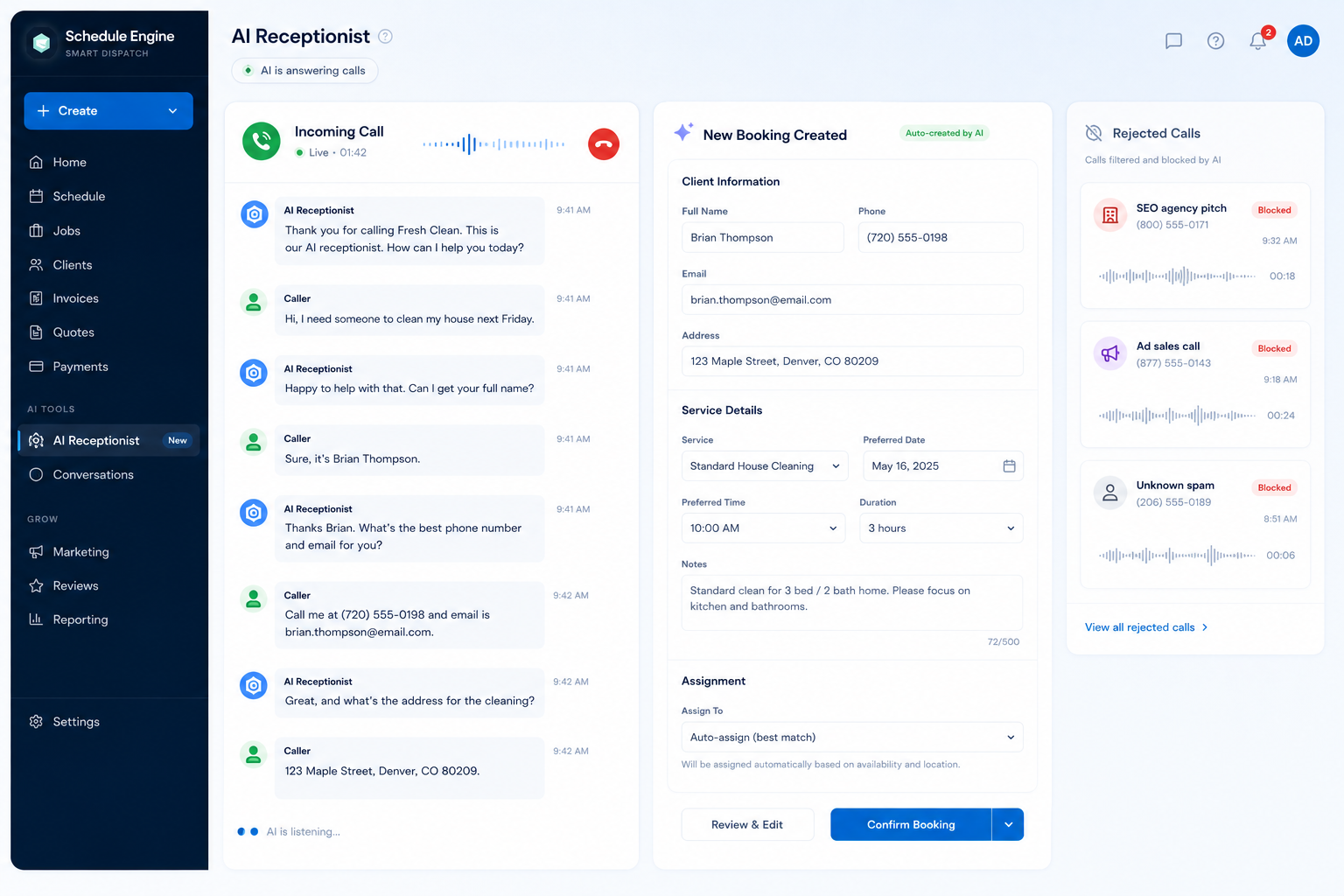
MyScheduleEngine AI receptionist screen for handling client calls and booking requests
● Live · 01:42
Feature 02 · AI Receptionist

Let the AI receptionist answer the phone.

Incoming calls should turn into booked jobs — not another interruption while you're working. The receptionist answers, filters spam, collects the right details, and routes real customers into MyScheduleEngine.

No more stopping a job because another agency wants to "rank you number one on Google." The AI handles the call. You handle the work.

  • Answers when you're busy on the job
  • Filters spam, sales calls, and low-value interruptions
  • Collects name, phone, email, address, service, date/time
  • Creates or updates the customer record automatically
  • Sends confirmations and reminders after the booking lands
Feature 03 · Unified messages

Every client conversation, tied to the work.

Stop hunting through email, SMS, calls, and notes. Keep communication connected to the client, job, quote, and invoice — automatically.

  • Email and SMS workflows
  • Templates for quotes, jobs, and invoices
  • Full client message history per job
  • Internal team notes attached to the job
  • iMessage / WhatsApp / SMS AI command layer
app.scheduleengine.com/chat
Inbox
John Doe9:14
Friday 10 works! Thanks
Sarah J.8:42
Confirmed — see you tomorrow
Brian T.8:20
Quote looks great
M. GarciaYest
Receipt received ✓
John Doe
Job #1042 · Deep Clean · Fri May 15, 10:00 AM
● iMessage
Hi, I need a cleaning next Friday.
Sure! What's your name, phone, email, address, and preferred time?
John Doe, 555-0149, john@email.com, 120 Maple St, Friday morning.
You're booked for Friday at 10 AM. I added the job, queued the confirmation, and updated the schedule.
Job #1043 created · Reminder queued · 24h confirmation sent
app.scheduleengine.com/invoices

Invoices · This month

Outstanding $3,240 · Paid $8,950
INV-1042 John Doe $220 Paid
INV-1041 Sarah Johnson $140 Sent
INV-1040 Emily Davis $260 Follow-up 2
INV-1039 Robert Wilson $300 Paid
INV-1038 M. Thompson $140 Reminder sent
Auto follow-up sent to 3 overdue invoices · 7 review requests queued
Feature 04 · Money & reviews

Invoices, payments, receipts, and Google reviews — automated.

Turn completed work into invoices, payment follow-ups, receipts, expense tracking, and review requests without rebuilding the same admin checklist by hand every day.

  • Auto-send invoices and receipts
  • Payment tracking and unpaid-invoice follow-ups
  • Expense ledger + team payout visibility
  • Google review link sent after every completed job
  • QuickBooks sync SOON
Main USP

An AI assistant with hands on the software.

Most software still makes you click through every booking, reminder, invoice, and follow-up. MyScheduleEngine is built around an assistant you can text. Tell it what needs to happen — it works inside the SaaS for you.

Send reminders to tomorrow's jobs.
8 reminders sent
Follow up with everyone who hasn't paid.
5 follow-ups queued
Book John Smith for Friday at 2.
Booked Fri May 16 · 2:00 PM
Show unpaid invoices from this week.
3 invoices · $720 outstanding
Send review links to completed jobs.
7 review requests sent
Start a rebooking campaign for last year's clients.
Campaign queued · 142 clients

Control the back office from chat.

The bigger vision is an AI operator. Tell it what needs to happen, and it handles the software instead of making you dig through tabs.

  • Text-based booking from iMessage, WhatsApp, SMS, web chat
  • Lead qualification + customer detail collection
  • Appointment scheduling + after-hours response
  • Updates records inside MyScheduleEngine
  • Operator commands across reminders, invoices, reviews

Not just another chatbot. An AI operator for the back office of your service business.

Feature 06 · Quotes

Stop letting good quotes die in the inbox.

Create quotes, send them, track approval, and follow up before the lead goes cold.

  • Quote follow-up automation
  • Quote-expiry alerts
  • Convert approved quotes into jobs
  • Team assignment + service details stay attached
app.scheduleengine.com/quotes

Quotes · 18 open

Pipeline value $5,420
Q-2104 Aaron Lee $1,870 Approved
Q-2103 Marina Estates HOA $4,280 Sent · 3d ago
Q-2102 Greenwood Office $2,150 Follow-up due
Q-2101 Riverside Cafe $720 Approved
app.scheduleengine.com/schedule

This week

12 jobs · 4 providers · $2,870
Mon
Tue
Wed
Thu
Fri
8a 10a 12p 2p 4p
Sarah J. — Deep Clean
M. Thompson — Std
E. Davis — Move Out
Riverside Cafe
Greenwood Office
John Doe — Deep
Aaron Lee
24h reminders auto-sent · On-my-way SMS armed
Feature 07 · Schedule

Book the job, keep everyone notified.

Schedule visits, assign providers, and keep clients and team members clear on where to be and when.

  • Calendar + dispatch view
  • Team assignment
  • Client + provider reminders
  • On-my-way SMS
  • Recurring job support
Feature 08 · Reports

See the numbers behind the work.

Track revenue, quote conversion, cash flow, lead conversion, job performance, and unpaid invoices without building another spreadsheet.
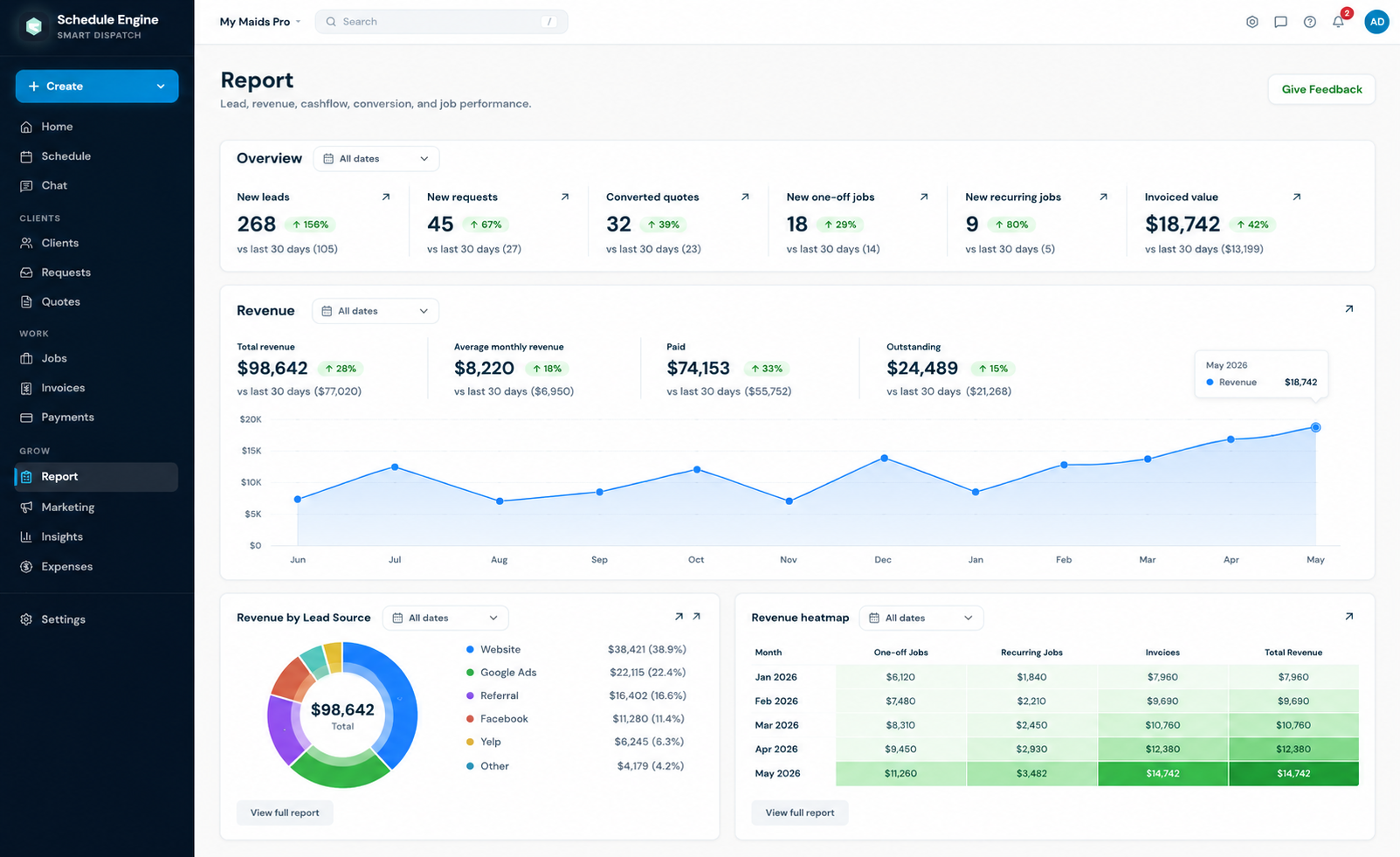
  • Revenue overview + trends
  • Quote conversion
  • Cashflow + receivables
  • Job performance
  • Client + pipeline visibility
MyScheduleEngine reporting dashboard showing service business income and cashflow
Built for outcomes

Built to remove hours of admin every week.

Follow up on every open quote

92% workflows running

Book jobs from text without opening the app

100% workflows running

AI receptionist handles calls while you work

84% workflows running

See today's schedule at a glance

76% workflows running

Send invoices before the day gets away

88% workflows running

Track revenue from quote to payment

80% workflows running

Keep client history tied to every job

72% workflows running

Turn completed jobs into review requests

95% workflows running
One operational hub

One dashboard, plus an AI assistant that can run it with you.

Every step of the workflow lives in one place — from incoming calls and texts to revenue rolling in. The AI assistant doesn't sit beside the software. It works inside it.

MyScheduleEngine command center with jobs, invoices and client workflow panels
Open quotes that need follow-up AI command panel booking from chat AI receptionist turning a call into a booking Technician workload by day Unpaid invoices + revenue visibility
Integrations

Fits into the tools your business already uses.

QuickBooks, Stripe, Gmail, SMS, WhatsApp, Google Calendar, and more. Keep your accounting clean while jobs, payments, communication, and follow-ups stay in one operational hub.

QuickBooks
Gmail
Stripe
WhatsApp
iMessage
Google Calendar
Twilio integration logo
Slack integration logo
QuickBooks
Gmail
Stripe
WhatsApp
iMessage
Google Calendar
Twilio integration logo
Slack integration logo
QuickBooks
Gmail
Stripe
WhatsApp
iMessage
Google Calendar
Twilio integration logo
Slack integration logo
Google
Zapier
HubSpot
Mailchimp
Xero
Intercom
Notion
Square
Google
Zapier
HubSpot
Mailchimp
Xero
Intercom
Notion
Square
Google
Zapier
HubSpot
Mailchimp
Xero
Intercom
Notion
Square
Product walkthrough

See the command center before you pick a package.

A quick Loom walkthrough shows how jobs, conversations, invoices, automations, and the AI employee fit together inside MyScheduleEngine.

AI booking Dispatch Invoices Follow-ups
loom.com/share/schedule-engine Walkthrough
Packages

Choose the package that fits your service business.

Start with a 14-day free trial. Starter covers the essentials, Pro adds AI and automation, and Max unlocks unlimited AI plus growth tools.

Starter

Daily operating system

New starter package
$39/mo
14-day free trial

Run your day-to-day quoting, scheduling, invoicing, and payments in one place.

Core operations
Schedule and manage jobs
Send quotes and invoices
Accept online payments
24/7 online booking page
Client and team
Appointment reminders and on-my-way texts
Two-way text and email inbox
Track time, expenses, and receipts
Income and cashflow reports
Up to 3 users
Pro

AI and automations

Best for growing teams
$99$79/mo
Most popular

Your follow-up, fully automated, plus your first AI Employee to handle the busywork.

Everything in Starter, plus
AI Employee - 150 actions/mo
Replies to leads, books jobs, and answers client texts
Automated quote follow-ups
Automated payment reminders
Automated review requests
More automation
Automated client win-back
Automated booking confirmations and follow-ups
Automated quote expiry alerts
Auto-booking from open slots
Pipeline and job profitability insights
Up to 10 users
Max

Unlimited AI and growth

Best value
$199/mo
Everything included

Everything unlimited, with AI no caps, accounting sync, and your marketing command center.

Everything in Pro, plus
Unlimited AI Employee
AI Receptionist
Unlimited users
Priority support
QuickBooks accounting sync
Growth command center
Meta dashboard
Ad Manager
SEO reports
Social autopilot
FAQ

MyScheduleEngine FAQ

Straight answers about MyScheduleEngine pricing, free trials, service-business fit, and AI assistant workflows.

What is MyScheduleEngine?

MyScheduleEngine is scheduling, dispatch, quoting, invoicing, and AI assistant software for service businesses that need one command center for jobs, client messages, and follow-up.

How much does MyScheduleEngine cost?

MyScheduleEngine costs $39 per month for Starter, $79 per month for Pro, and $199 per month for Max. Every plan includes a 14-day free trial.

What types of business is MyScheduleEngine for?

MyScheduleEngine is for cleaning, landscaping, HVAC, plumbing, roofing, and other field-service teams that schedule jobs, send quotes and invoices, and manage client communication.

Does MyScheduleEngine have a free trial?

Yes. MyScheduleEngine includes a 14-day free trial.

Can MyScheduleEngine book jobs automatically from text messages?

Yes. The MyScheduleEngine AI assistant can collect client details from iMessage, WhatsApp, or SMS, book the job, update the schedule, and trigger the next workflow steps.

What can the MyScheduleEngine AI Employee do?

The MyScheduleEngine AI Employee can reply to leads, book jobs, follow up on quotes, send payment reminders, and send review requests.

Stop booking jobs by hand and running the business from memory.

Text the AI assistant, let the AI receptionist handle incoming calls, automate the repetitive work, keep communication together, and give your team one place to run the day.

Job completed
auto
Invoice sent
auto
Payment received
auto
Review request sent
auto
Revenue updated
auto
AI ready for the next command
armed
AI receptionist ready for the next call
armed

For service businesses, home-service teams, contractors, providers, and field crews that want fewer missed follow-ups and cleaner ops.